 PlaySpectrum
PlaySpectrum
PlaySpectrum
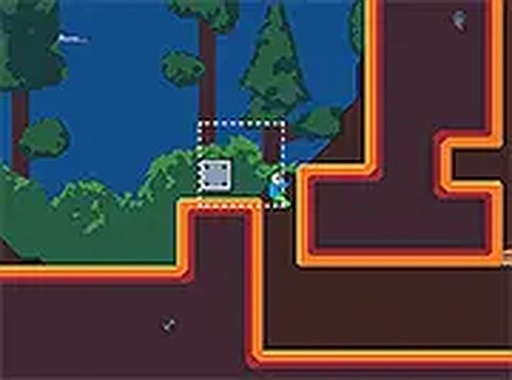
Crate Navigation Quest offers a satisfying mental workout through its well-designed spatial puzzles. The controls are intuitive, letting players focus entirely on strategy. Each level builds on the last, introducing new complexities without overwhelming newcomers. The minimalist visuals and calm audio help maintain concentration. While it lacks an undo feature, the ability to restart quickly keeps frustration low. This is a solid choice for anyone who enjoys methodical problem-solving in a browser-based format.
Each stage presents a confined area filled with movable containers and fixed obstacles. The objective is to clear a route to the designated exit point. Containers can be shifted by walking into them, but their placement affects subsequent moves. This creates a chain of dependencies where one action influences future possibilities. Players must evaluate the entire layout before making their first move. The challenge lies in sequencing pushes and jumps correctly to avoid getting stuck.
Movement is handled through standard keyboard inputs. Arrow keys or WASD allow the character to navigate left, right, up, and down. A dedicated jump button helps the character cross gaps or climb onto raised platforms. The controls respond quickly, so each move is executed precisely as intended. This simplicity lets players focus entirely on solving the spatial puzzle rather than mastering complex commands.
Early stages introduce basic mechanics with few containers and straightforward paths. As players advance, stages incorporate more containers, tighter spaces, and elevated platforms that require precise jumping. The difficulty curve is gradual, allowing newcomers to build familiarity with the rules. Later puzzles demand multi-step planning where moving a container too early can block progress. This structure rewards patience and methodical thinking.
The visual style is clean and minimal, with distinct colors for the character, containers, walls, and exit. This clarity helps players quickly identify interactive elements. Background music and sound effects are subtle, providing feedback for successful moves without becoming distracting. The overall presentation supports concentration on the logical challenge.
This game runs entirely in a web browser with no installation required. A full-screen mode is available for an expanded view. It is designed for desktop computers and does not support touch input. The content is appropriate for all age groups, with no violent or mature themes. Players can start immediately after loading the page.










Player Comments
Sign in to comment
You must be logged in before posting a review or rating.
No account? Create one
No comments yet. Be the first to comment!